Additional Terms (AT)
The ATs define distribution rights and restrictions specific to each Microsoft Product. The Additional Terms are available on MyOEM.
Your IoT/Embedded Channel Partner & more
Complete guide to the embedded OEM licensing process, from CLA to device shipment.
Step-by-step guide
Embedded OEM Customer (OEM) contacts Elbacom as a Microsoft Authorized Embedded Distributor.
Elbacom initiates the digital Embedded OEM Customer License Agreement (OEMCLA) which enables the OEM to buy licenses and retrieve OEM Pre-Installation Kits (OPKs). Elbacom provides Additional Licensing Provisions (ALPs) for the chosen embedded product.
Embedded OEM Customer (OEM) fills out the CLA online. Elbacom and Microsoft check the data and approve the CLA.
The OEM will receive the digital CLA contract. After the OEM signs it, Microsoft will counter sign it.
The customer can now order licenses and OPKs.
Elbacom provides Embedded OEM Customer (OEM) licenses, OPKs, toolkits.
Embedded OEM Customer (OEM) starts shipping devices.
The CLA defines the standard licensing terms which enable the Embedded OEM to buy Embedded licenses and receive OEM Pre-Installation Kits. A Customer License Agreement is valid for 5 years. A customer must have a valid CLA in order to get licences or OEM Pre-Installation Kits. More information about the CLA is available here.
Learn about CLA →The ATs define distribution rights and restrictions specific to each Microsoft Product. The Additional Terms are available on MyOEM.
OPKs include components such as preinstall tools, product bits, pre-installation manual, and a Product Key. One OPK provides all the tools (e.g. Setup-DVD) which are necessary to install the embedded operating system.
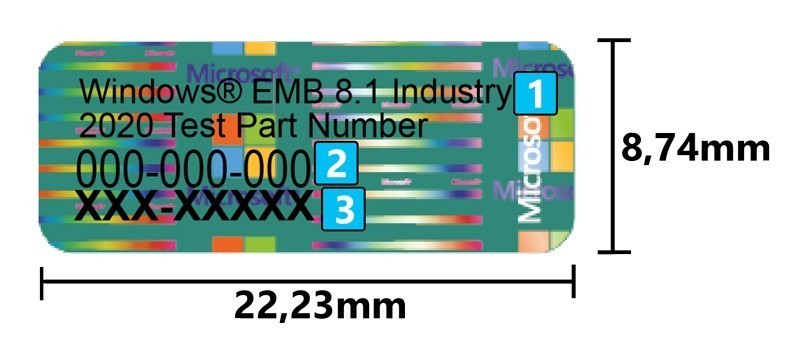
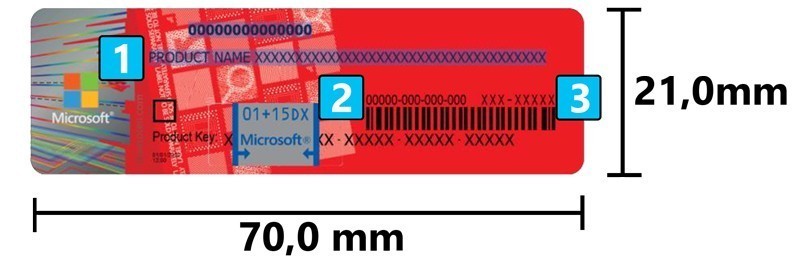
A COA is a product specific license sticker which must be attached to an embedded device prior to device distribution. Each COA represents a license to distribute a single Embedded System with MS Products installed. A COA is required for each Embedded System that the OEM Customer distributes.
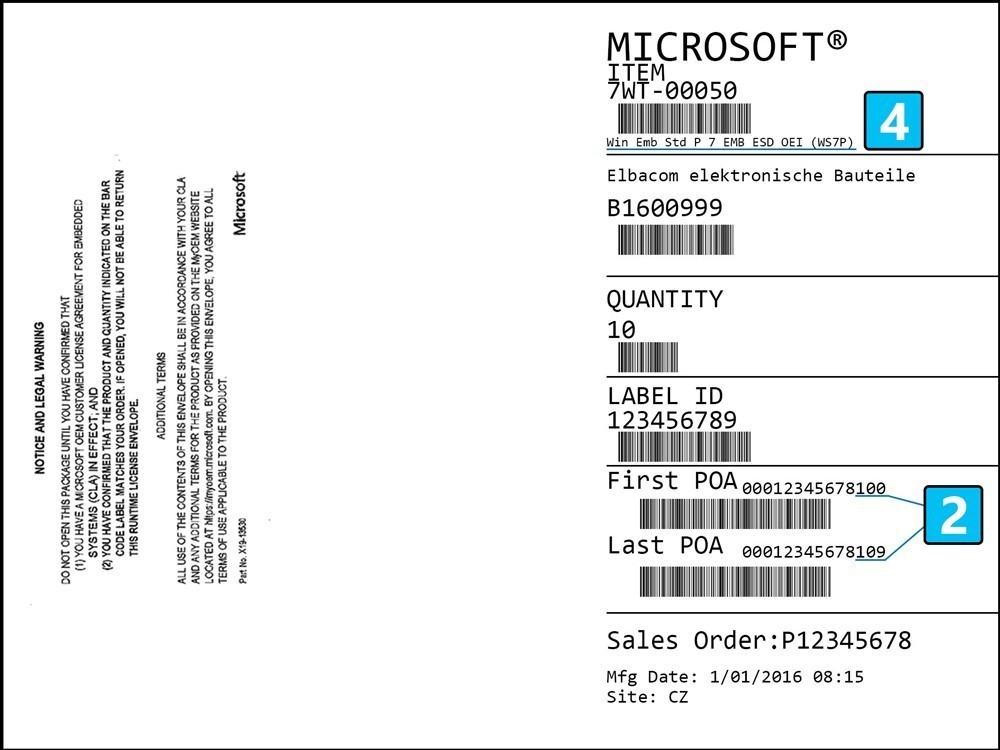
The Certificates of Authenticity (COA) are delivered in an envelope which provides detailed information on the contents – Full Product Name and Microsoft SKU, Number of units, included first and last serial numbers, etc.
The COAs are located on a strip of carrier material from which they can be easily removed before attaching them on the devices.
There are 2 different types of COAs – both shown below.
All Windows 10 IoT EPKEA versions, Windows Embedded Standard and Windows Embedded Compact products use the smaller "Thumbnail COA".
All Windows 10 IoT PKEA versions, Windows Embedded Enterprise and Windows Embedded Server products use the regular size COAs.
Not the full license name. Sometimes different products have the same "Shortened Product Title" on the COAs!
Also found on the envelope's COA serial number range
Unique identifier for the product
Only visible on the envelope